PhotoPrompt
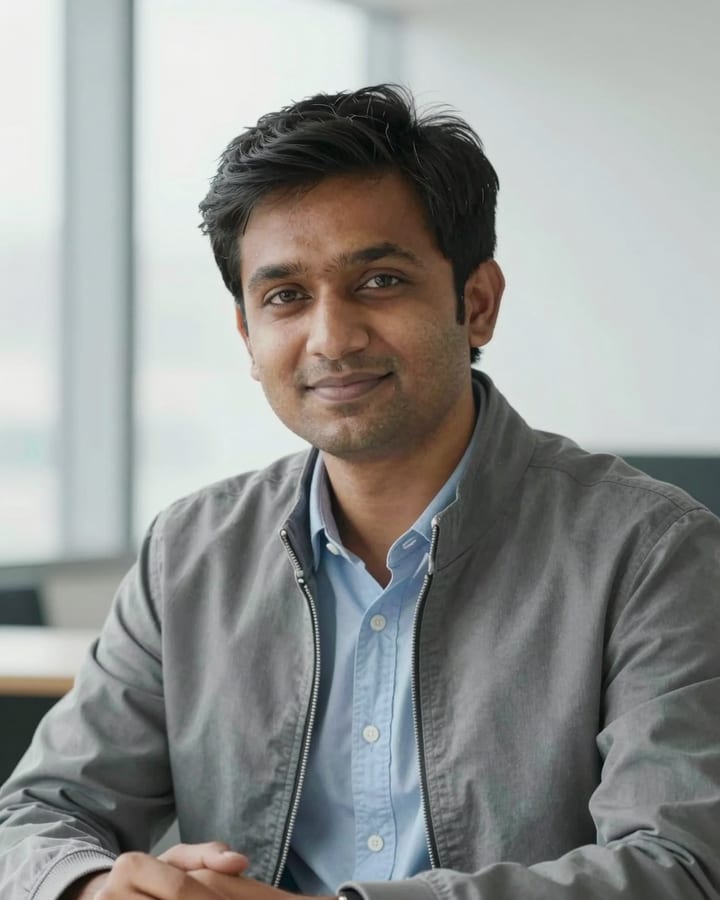
Office Window Light Headshot AI Photo Prompt
Gemini & ChatGPT
Suits a resume, company page, conference badge photo or email signature.
Make this a professional headshot from my uploaded photo, with my real face, eye colour, skin tone, hair and any glasses unchanged and no airbrushing. Outfit: a light blue formal shirt with the top button open, under a slim dark grey jacket. Background: a bright modern office with a large window, softly out of focus. Pose: shoulders angled slightly, head straight, relaxed friendly expression. Soft daylight from the window on one side, 85mm lens, clean natural colours, neat tidy collar. Square 1:1 crop, head and shoulders.
How to use this prompt
- Copy the prompt above.
- Open Gemini or ChatGPT and attach your own photo.
- Paste the prompt and send it.
Tips for a better result
- Send a photo with even light on the face; harsh shadows get carried into the headshot.
- If it looks too stiff, ask for "a slight natural smile with relaxed shoulders".
Ways to change it
- White shirt: Change to a plain white shirt with a navy tie.
- Plain wall: Replace the office with a soft light-grey wall for a simpler look.
Use only your own photo or one you have clear permission to use. Do not use photos of children or of anyone without their consent.
The sample photo was rendered by JadooKit with an open AI model and shows no real person. Your result in Gemini or ChatGPT will look different.