PhotoPrompt
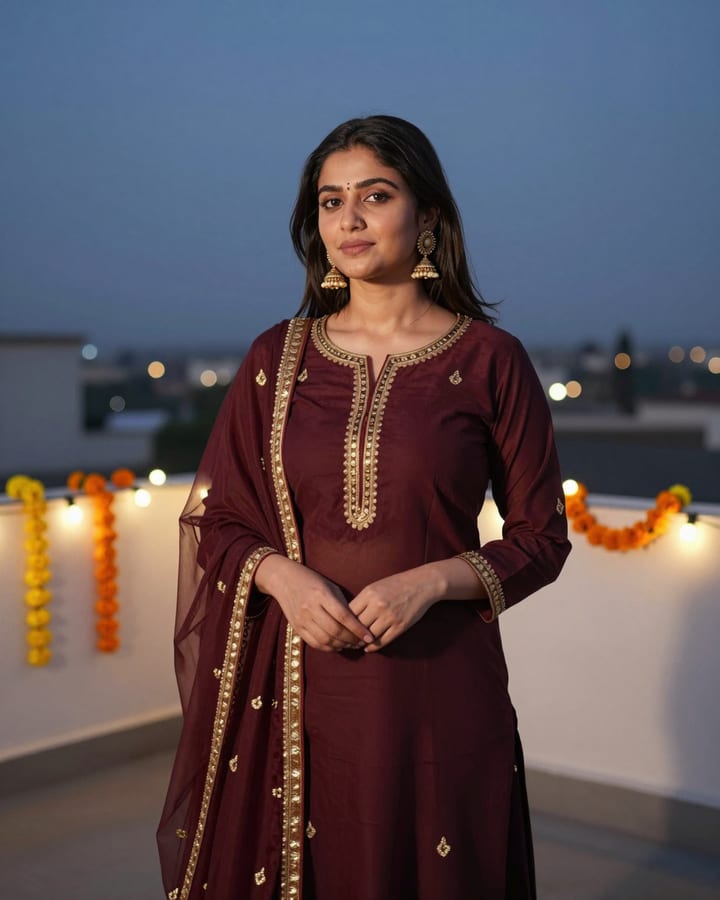
Maroon Sharara Terrace Evening AI Photo Prompt
Gemini & ChatGPT
A festive choice for Diwali and Eid greetings, family function pictures and shared WhatsApp status.
Convert my uploaded photo into a festive terrace portrait where my real face, skin tone, eyebrows and hair stay completely unchanged. I wear a maroon sharara suit with delicate gold gota edging, a matching net dupatta pinned over one shoulder, small jhumkas and a few glass bangles. I stand on a rooftop terrace strung with warm fairy lights and marigold garlands, a low cushioned seating area behind me, dusk sky in deep indigo. Pose with one hand gently lifting the dupatta, warm smile at the lens. 50mm lens, warm string-light bokeh, maroon, gold and indigo palette, 4:5 aspect ratio.
How to use this prompt
- Copy the prompt above.
- Open Gemini or ChatGPT and attach your own photo.
- Paste the prompt and send it.
Tips for a better result
- Upright photos with some space around your arms help the wide sharara fall naturally.
- If gold edging looks too glittery, ask for subtle matte zari instead.
Ways to change it
- Rangoli corner: Add a small flower rangoli and a row of earthen lamps along the terrace floor.
- Teal outfit: Change the sharara to deep teal with silver edging.
Use only your own photo or one you have clear permission to use. Do not use photos of children or of anyone without their consent.
The sample photo was rendered by JadooKit with an open AI model and shows no real person. Your result in Gemini or ChatGPT will look different.